The Web GUI
The web GUI is the desktop GUI's NeXT worksheet in a browser. egui draws
it into a WebGL canvas, from the desktop's own theme, window, menu and
formula-highlighting code. The model, the engine and the store stay in
improv-server: the browser draws what the server sends and sends back
what you type, and it computes nothing. A derived cell is always the
server's answer, which is what lets the server hide what a user may not
see (see Access).
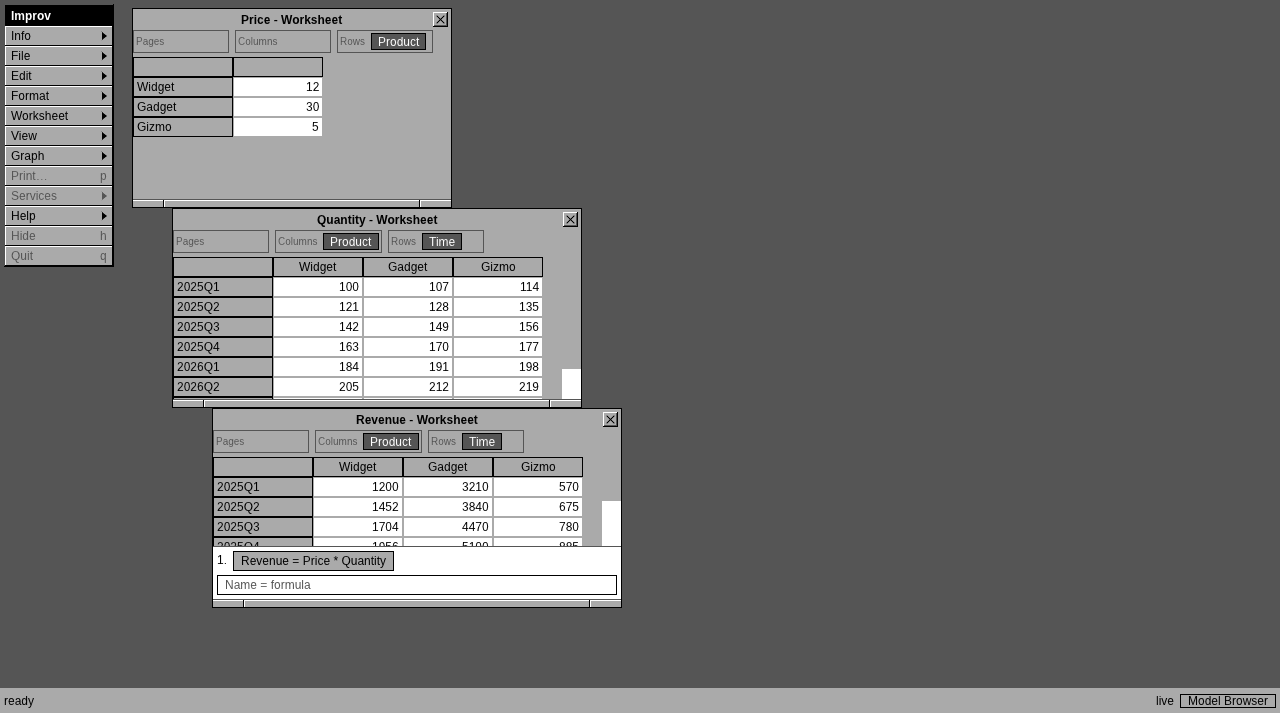
Three worksheets in the browser after logging in; the status bar says
live while the change stream is up.
Serve it
Build it once (it needs the wasm32-unknown-unknown Rust target and
wasm-bindgen-cli at the version in Cargo.lock; build.sh says which
when it is missing), then serve it beside the API:
rustup target add wasm32-unknown-unknown
cargo install wasm-bindgen-cli --version 0.2.130 --locked
crates/gui_web/build.sh --release web        # index.html, the .js and the .wasm, in ./web
IMPROV_API_TOKEN_FILE=/etc/improv/tokens improv-server sales.db 127.0.0.1:3000 --static ./web
Open http://127.0.0.1:3000/. The page and the API share one origin, so
no CORS is needed. For anything past your own machine, put TLS in front
(a proxy, as The HTTP Server shows): the token
travels on every request.
Log in
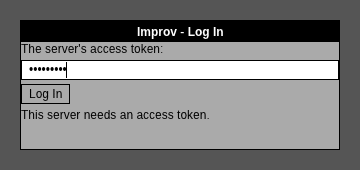
A server with tokens asks for one. Type it in the login panel. The page
holds it in memory only, never in the URL, a cookie or the browser's
storage, and sends it as Authorization: Bearer. Nothing rides on a
cookie, so another site cannot make your browser act for you (CSRF). A
reload asks for the token again. A read-only token
(IMPROV_API_TOKENS_RO) shows the model and refuses edits. A server in
open mode (no tokens, loopback only) logs in at once.
What it does
- Worksheets. Each measure in its own window, NeXT-style: the title bar, close box and resize bar. The first view, or else the first three measures, open at start. Windows move and resize as on the desktop.
- Pivoting. Each worksheet has Pages, Columns and Rows gutters, with a tile for each category. Drag a tile to another gutter to pivot, or right-click it for Move to…. Several categories may stack on one axis. A page category's tile has a list to pick the page item from, and every item of a page category can be picked.
- Cells. Double-click an input cell to edit it, then Enter writes it
(Esc cancels). A value is read by the measure's type: numbers as the
desktop reads them (
$1,500), text,true/false, dates (2025-01-31). An empty cell clears it. A refused edit says why, and the cell shows the server's value again. - Formulas. The key window (the one with the black title bar) has the
formula pane: every formula, as typed. Click one to edit it, then Enter
saves. The
Name = formulaline adds a formula (or a LAMBDA). Both editors autocomplete measures, categories and functions (Up and Down pick, Tab accepts, Esc closes). A formula the server refuses is underlined where it went wrong, with the message and a hint, as on the desktop. - Menus. The desktop's main menu, Improv 1.0's (see the desktop GUI), with the commands the web GUI has; the rest draw grayed. Edit has Undo and Redo (Ctrl+Z, Ctrl+Shift+Z), Add Category, Add Item, Add Input Measure, Rename and Delete…. Format has the decimals and thousands separators. Worksheet has Save View. View has New View (another window on the same measure), Close Window and Swap Rows/Columns, then the saved views. Help ▸ User Guide opens this guide. File ▸ Model Browser…, or the status bar's Model Browser button, lists measures, categories and items, to open, rename, add and delete them.
- Undo is per window session: each page load is a session, and its Undo undoes its own changes, not another user's.
- Live updates. The page reads the server's change stream
(
GET /v1/changes). An edit in another browser, the CLI or the desktop GUI shows within a fraction of a second (about 0.1 s measured on one machine), with the cells it recalculated. The status bar sayslivewhile the stream is up. When the connection drops, the page retries with backoff and resumes from the last version it saw, so nothing is missed. A structural change (a new category, a renamed measure) makes it re-read the model.
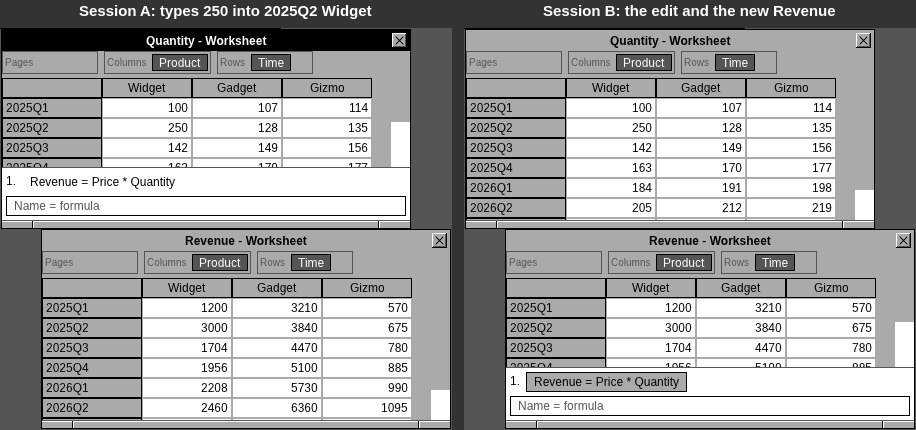
Session A types 250 into Quantity; session B, another login, shows it and the server's new Revenue (12 × 250) without reloading.
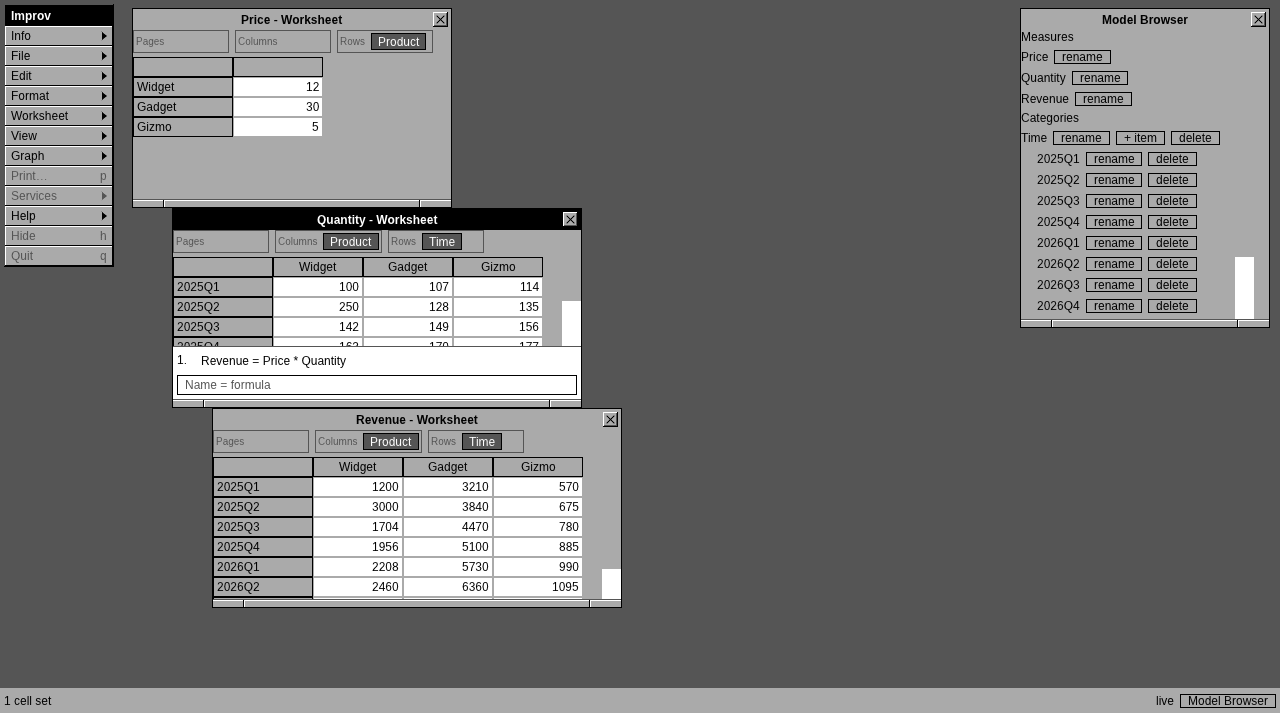
The Model Browser, opened from the status bar's Model Browser button.
What it does not do yet
The CSV wizard, graphs, the Info panel, the Inspector and the Format panel, printing, context help, function help (F1), scenarios, item filters, keyboard navigation of the grid, and range selection with Copy and Paste are desktop-only. A model with more than about 200,000 cells on one page needs paging the grid does not do yet.
Access
Every request goes through the server's token check, then through the model's access policies, for each measure, item and cell it touches, with the token's name as the Cedar user (see The HTTP Server). A hidden measure, item or cell is absent from what the page receives, and an edit of a cell the user may not change is refused. Totals stay computed over everything, by the server.
Accessibility
Not screen-reader accessible. eframe's web runner does not pass egui's AccessKit tree to the browser (as of eframe 0.37), so a screen reader sees one canvas. The desktop GUI is accessible (AccessKit, H2). Building a hidden DOM table that mirrors the visible grid for screen readers is on the plan (road-to-1.0 I2). Until then, use the desktop GUI or the TUI with a screen reader.
Testing it
scripts/web-e2e.sh runs it all: it builds the web GUI, improv and
improv-server, runs the end-to-end check below, and compares the first
frame with the golden, docs/reviews/golden/web-1280x713.png (--update
replaces it). crates/gui_web/e2e/e2e.sh builds a model with the CLI, serves it and a
web build with improv-server, and drives two browser sessions in
headless Chromium over the DevTools protocol (drive.py). It edits a
cell in one and checks the other shows it, recalculated, within a second.
It restarts the server mid-session and checks the other session catches
up, then pivots by dragging a tile and types a misspelled formula to
check where the error lands. The app publishes its visible cells, tiles
and formula error on <body data-…>, which is how a test reads a canvas.